Jira budget tracking with forecasts and alerts
Biller Plus adds Jira budget tracking that looks ahead. Forecasts show where each budget ends up, and alerts tell you before a project goes over.
Acme Portal Rebuild
Fixed fee, sample data
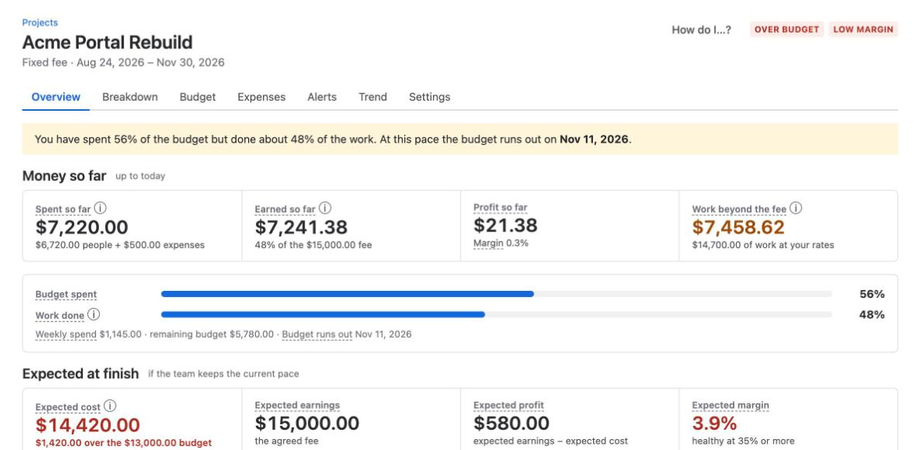
Expected cost at finish
$14,420
$6,720 spent on people + 90 remaining hours × $80 + $500 expenses = $14,420
Spending runs ahead of the work, so the alerts fire before the budget is gone. The marks show the alert levels: 50, 75, 90 and 100% of the budget.
Spend against work done
The sample project has spent 56% of its budget and finished about 48% of the work. At this pace the budget runs out on Nov 11, 2026.
Four ways to forecast
Each project uses one method. A forecast is never lower than the actual cost, and the forecast total cost adds expenses to date.
| Method | Forecast cost |
|---|---|
| Actual ÷ % complete (default) | With the hours method, this equals actual + remaining hours × blended rate |
| Remaining estimates | Actual + remaining estimate × blended cost per hour so far |
| Weekly burn | Actual + average weekly burn (last 4 weeks) × weeks until the end date |
| Manual | Actual + expected remaining hours × blended rate, or a manual forecast cost |
In the sample: $6,720 + 90 hours × $80 = $13,920. Add $500 of expenses and the forecast total cost is $14,420, which is $1,420 over the $13,000 budget.
What triggers an alert
Alerts name the Epic that caused them.
- The project reaches 50, 75, 90 or 100% of its budget. On the sample budget, those are $6,500, $9,750, $11,700 and $13,000.
- The forecast goes over budget.
- Margin drops.
Where alerts arrive
No alert contains the rates of individual people. The privacy policy lists what each alert sends.
| Jira | Alerts appear under Notifications. |
| Each person turns this on and confirms the address with a 6-digit code. Off until then. | |
| Slack or Microsoft Teams | A finance admin adds a channel webhook. Choose one message per project each day, or one per alert. |
Project health
Two checks decide the label, and the worst check wins. You can change the thresholds per project and in Settings.
| Check | Healthy | At Risk | Over Budget |
|---|---|---|---|
| Forecast ÷ budget | ≤ 90% | ≤ 100% | Above 100% |
| Margin | ≥ 35% | ≥ 20% | Below 20% |
Budget changes leave a trail
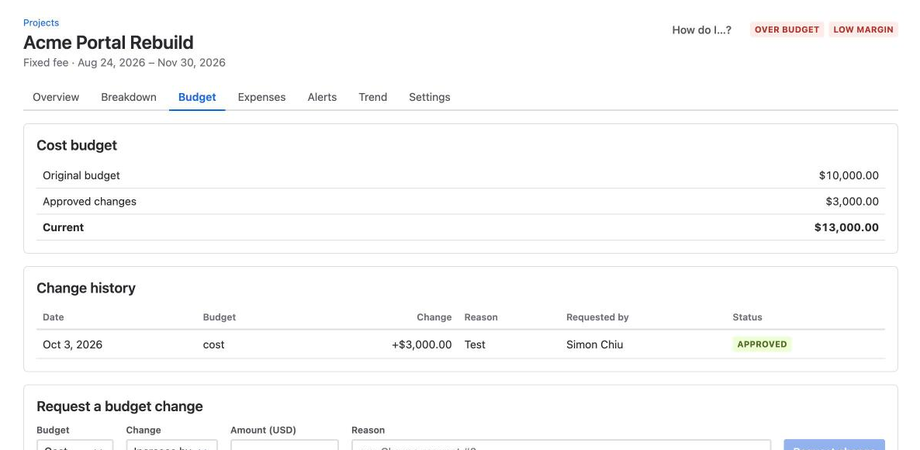
The current budget is the original budget plus approved changes. Finance approves each change, so the original and the current budget are both clear.